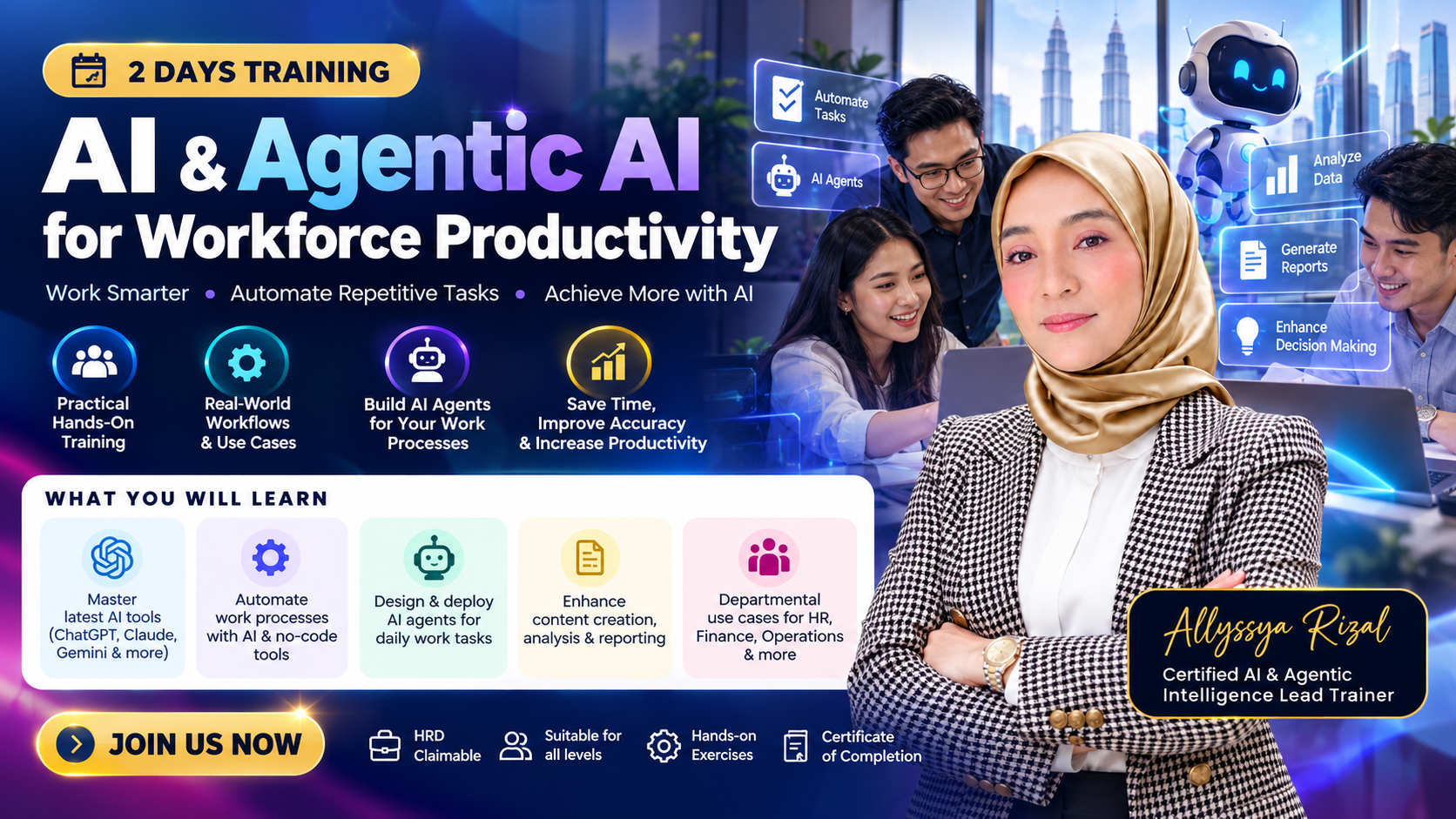
AI & Agentic AI for Workforce Productivity
Programme Overview This 2-day interactive online training equips professionals with practical skills to leverage Generative AI, prompt and context engineering, and Agentic AI to improve workplace productivity, automate repetitive tasks, and streamline business processes. Participants will explore the latest AI developments, learn to use AI for everyday workplace tasks, and progress towards building customised AI assistants and intelligent workflows using no-code and low-code tools. Through live demonstrations, guided hands-on exercises, and real-world business scenarios, participants will gain practical experience in applying AI to improve efficiency, accuracy, and decision-making. Who Should Attend Government officers, corporate executives, managers, administrators, HR, finance, procurement, operations, and other professionals seeking to enhance workplace productivity through AI. No programming experience required. What You Will Learn Understand the latest Generative AI, LLM, and Agentic AI developments. Apply prompt and context engineering for effective AI interactions. Use AI for emails, reports, documents, presentations, and research. Analyse Excel data and generate actionable business insights. Understand AI agents, autonomous tasks, and intelligent workflows. Build customised AI assistants using organisational knowledge. Automate repetitive tasks using no-code and low-code platforms. Connect AI with emails, forms, spreadsheets, and business tools. Apply responsible AI practices and human oversight. Develop practical AI-powered workplace solutions. Course Outline Day 1: Generative AI for Workplace Productivity Module 1: AI & Agentic AI Fundamentals Explore the latest developments in Artificial Intelligence, Generative AI, Large Language Models (LLMs), and Agentic AI, including emerging capabilities, industry trends, and practical workplace applications, incorporating updates available by November 2026. Module 2: Effective Prompt & Context Engineering Master practical prompt and context engineering techniques to generate accurate, structured, and professional AI outputs for communication, problem-solving, reporting, and daily business tasks. Module 3: AI-Powered Document & Content Productivity Use AI to create, summarise, analyse, and manage reports, proposals, presentations, meeting minutes, SOPs, emails, and other professional documents. Module 4: AI for Data Analysis & Decision Support Leverage AI to analyse Excel and CSV datasets, generate formulas, identify trends, create charts, and produce actionable insights for business decision-making. Day 2: Agentic AI & Intelligent Workflow Automation Module 5: Introduction to Agentic AI & AI Agents Understand AI agent architecture, autonomous task execution, multi-step reasoning, tool integration, and practical applications of agentic workflows in business operations. Module 6: Building Custom AI Assistants Design and develop customised AI assistants using organisational documents, policies, SOPs, and knowledge bases to support information retrieval and departmental productivity. Module 7: AI Workflow Automation & Agent Orchestration Explore no-code and low-code automation tools to connect AI with emails, forms, spreadsheets, and business applications, enabling intelligent task automation and workflow coordination. Module 8: Building AI-Powered Workplace Solutions Design, build, and test practical AI-powered workplace solutions by integrating AI assistants, intelligent workflows, and automation to address real business challenges. What You Will Take Away Ready-to-use AI productivity and prompt templates. Practical AI tools for workplace communication and reporting. Hands-on experience analysing business data with AI. A customised AI assistant prototype. An AI-assisted workflow automation prototype. A practical framework for workplace AI adoption. A 30-day AI productivity implementation action plan. Training Format Delivery: Live Online via Zoom Duration: 2 Days (9:00 AM – 5:00 PM) Methodology: 30% Concepts | 70% Hands-On Practice Level: Beginner to Intermediate The programme combines live instructor demonstrations, interactive discussions, guided practical exercises, and real-world workplace scenarios. Participants must have a laptop or desktop computer, stable internet connection, Zoom access, and a web browser. Access to selected AI tools is recommended. Some advanced features may require paid subscriptions. Included 2 full days of live instructor-led Zoom training. Interactive AI and Agentic AI hands-on exercises. Prompt engineering templates and practical use cases. AI assistant and workflow automation exercises. AI productivity roadmap worksheet. Training materials and recommended AI tools. Certificate of Completion.

Schedule
- Mon23Day 1 · Mon, 23 Nov 20269:00 AM – 5:00 PM (MYT)8 h
- Tue24Day 2 · Tue, 24 Nov 20269:00 AM – 5:00 PM (MYT)8 h
Where
Join from anywhere with a laptop and a stable connection. The meeting link is on your ticket page as soon as you buy, and you can add the sessions to your calendar.
About this training
Programme Overview
This 2-day interactive online training equips professionals with practical skills to leverage Generative AI, prompt and context engineering, and Agentic AI to improve workplace productivity, automate repetitive tasks, and streamline business processes.
Participants will explore the latest AI developments, learn to use AI for everyday workplace tasks, and progress towards building customised AI assistants and intelligent workflows using no-code and low-code tools.
Through live demonstrations, guided hands-on exercises, and real-world business scenarios, participants will gain practical experience in applying AI to improve efficiency, accuracy, and decision-making.
Who Should Attend
Government officers, corporate executives, managers, administrators, HR, finance, procurement, operations, and other professionals seeking to enhance workplace productivity through AI.
No programming experience required.
What You Will Learn
- Understand the latest Generative AI, LLM, and Agentic AI developments.
- Apply prompt and context engineering for effective AI interactions.
- Use AI for emails, reports, documents, presentations, and research.
- Analyse Excel data and generate actionable business insights.
- Understand AI agents, autonomous tasks, and intelligent workflows.
- Build customised AI assistants using organisational knowledge.
- Automate repetitive tasks using no-code and low-code platforms.
- Connect AI with emails, forms, spreadsheets, and business tools.
- Apply responsible AI practices and human oversight.
- Develop practical AI-powered workplace solutions.
Course Outline
Day 1: Generative AI for Workplace Productivity
Module 1: AI & Agentic AI Fundamentals
Explore the latest developments in Artificial Intelligence, Generative AI, Large Language Models (LLMs), and Agentic AI, including emerging capabilities, industry trends, and practical workplace applications, incorporating updates available by November 2026.
Module 2: Effective Prompt & Context Engineering
Master practical prompt and context engineering techniques to generate accurate, structured, and professional AI outputs for communication, problem-solving, reporting, and daily business tasks.
Module 3: AI-Powered Document & Content Productivity
Use AI to create, summarise, analyse, and manage reports, proposals, presentations, meeting minutes, SOPs, emails, and other professional documents.
Module 4: AI for Data Analysis & Decision Support
Leverage AI to analyse Excel and CSV datasets, generate formulas, identify trends, create charts, and produce actionable insights for business decision-making.
Day 2: Agentic AI & Intelligent Workflow Automation
Module 5: Introduction to Agentic AI & AI Agents
Understand AI agent architecture, autonomous task execution, multi-step reasoning, tool integration, and practical applications of agentic workflows in business operations.
Module 6: Building Custom AI Assistants
Design and develop customised AI assistants using organisational documents, policies, SOPs, and knowledge bases to support information retrieval and departmental productivity.
Module 7: AI Workflow Automation & Agent Orchestration
Explore no-code and low-code automation tools to connect AI with emails, forms, spreadsheets, and business applications, enabling intelligent task automation and workflow coordination.
Module 8: Building AI-Powered Workplace Solutions
Design, build, and test practical AI-powered workplace solutions by integrating AI assistants, intelligent workflows, and automation to address real business challenges.
What You Will Take Away
- Ready-to-use AI productivity and prompt templates.
- Practical AI tools for workplace communication and reporting.
- Hands-on experience analysing business data with AI.
- A customised AI assistant prototype.
- An AI-assisted workflow automation prototype.
- A practical framework for workplace AI adoption.
- A 30-day AI productivity implementation action plan.
Training Format
Delivery: Live Online via Zoom
Duration: 2 Days (9:00 AM – 5:00 PM)
Methodology: 30% Concepts | 70% Hands-On Practice
Level: Beginner to Intermediate
The programme combines live instructor demonstrations, interactive discussions, guided practical exercises, and real-world workplace scenarios.
Participants must have a laptop or desktop computer, stable internet connection, Zoom access, and a web browser. Access to selected AI tools is recommended. Some advanced features may require paid subscriptions.
Included
- 2 full days of live instructor-led Zoom training.
- Interactive AI and Agentic AI hands-on exercises.
- Prompt engineering templates and practical use cases.
- AI assistant and workflow automation exercises.
- AI productivity roadmap worksheet.
- Training materials and recommended AI tools.
- Certificate of Completion.
Included
- check_circle2 days live Zoom training
- check_circleTraining slides & notes
- check_circle2-day session recordings
- check_circlePrompt engineering templates
- check_circleCertificate of Completion
Your trainer